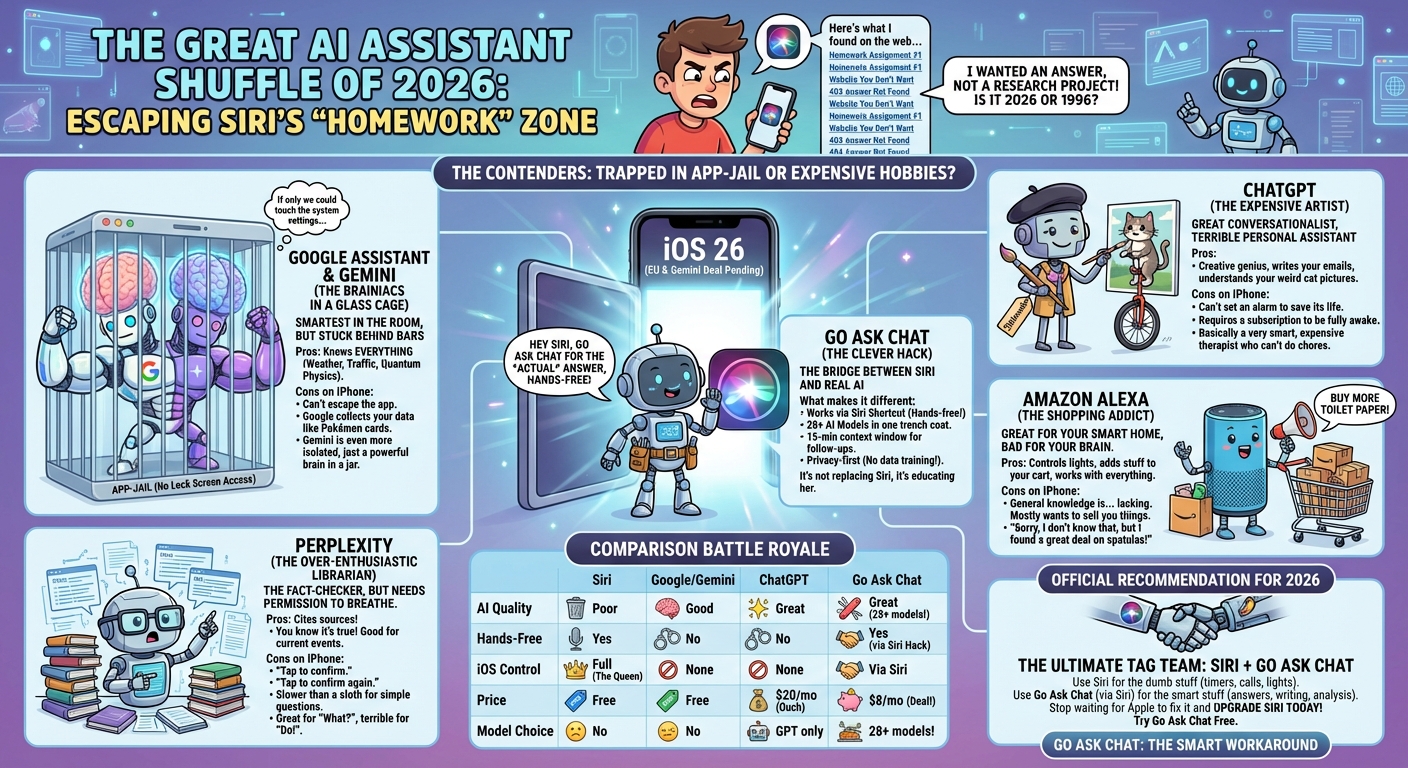
Best Siri Alternatives in 2026
Every way to get smarter AI on your iPhone
Siri's "Here's what I found on the web" response is frustrating. You want answers, not homework assignments.
The good news: 2026 has more options than ever. The landscape changed significantly:
- iOS 26 will allow third-party assistants as default (EU regulations driving this)
- Apple's Gemini deal promises a smarter Siri starting in iOS 26.4
- Multiple AI assistants now work on iPhone through apps and shortcuts
Let's break down each option.
Google Assistant has been the gold standard for voice assistants.
Pros:
- Best accuracy for factual questions
- Good context memory within a session
- Deep integration with Google services
- Real-time information (weather, traffic, sports)
Cons on iPhone:
- Can't set as default assistant (yet)
- No lock screen activation
- Can't control iOS system settings
- Limited app integrations on iOS
- Google collects significant usage data
Google Assistant is powerful, but on iPhone it's stuck in app-jail.
ChatGPT is excellent for complex conversations and creative tasks.
Pros:
- Great for nuanced, complex questions
- Excellent writing assistance
- Voice mode with natural conversation
- Image understanding and generation
- Built into Siri as an opt-in option
Cons:
- Zero iOS app integrations (can't send texts, set reminders, etc.)
- No real-time information without plugins
- $20/month for full features (ChatGPT Plus)
- Privacy concerns when signed in
- Must open app—no hands-free from lock screen
ChatGPT is a great AI, but it's not really an assistant—it can't do anything on your phone.
Gemini is Google's AI chat model—the brains, not the assistant.
Pros:
- Powerful multimodal AI (text, images, code)
- Free tier with generous limits
- Deep integration with Google Workspace
- Will power Apple's Siri starting iOS 26.4
Cons on iPhone:
- Poor iOS integration (app-only)
- No Siri Shortcut support currently
- Free tier uses your data for AI training
- No iOS automation capabilities
Gemini is smart, but on iPhone it's even more isolated than Google Assistant.
Amazon Alexa is great for smart home control but weaker for general knowledge.
Pros:
- Best smart home ecosystem integration
- Good at shopping, lists, and reminders
- Works with thousands of skills
- Syncs with your Echo devices
Cons:
- Worst at answering general knowledge questions
- Very limited iOS integration
- Often pushes Amazon products in responses
- AI capabilities lag behind Google and OpenAI
If smart home is your priority, Alexa works. For everything else, look elsewhere.
Perplexity is excellent for research-style questions with sources.
Pros:
- Cites sources for answers (great for fact-checking)
- Good at current events and recent information
- Clean, focused interface
- Some iOS action capabilities (calling, texting)
Cons:
- Requires confirmation taps for actions (not hands-free)
- No deep iOS integration
- $20/month for Pro features
- Slower than pure AI chat for simple questions
Perplexity is great for "what" questions. Less useful for "do" requests.
Go Ask Chat bridges the gap between AI chat and Siri integration.
What makes it different:
- Works via Siri Shortcut — Say "Hey Siri, Go Ask Chat" hands-free
- 28+ AI models — GPT, Claude, Gemini, Grok, and more in one app
- 15-minute context window — Ask follow-ups without repeating yourself
- Conversations saved — Access your chat history from any device
- Privacy-first — Never shares your data for AI training
It's not trying to replace Siri for setting timers or controlling HomeKit—Siri does that fine. It's for getting real AI answers through Siri.
Correct. Only Siri can truly control iOS. That's Apple's design.
No third-party app can:
- Activate from the lock screen with "Hey Siri"
- Send texts or make calls without user confirmation
- Control system settings (Wi-Fi, Bluetooth, etc.)
- Deep integrate with Apple apps (Messages, Calendar, Reminders)
This changes somewhat with iOS 26 in the EU (third-party default assistants), but even then, system-level control stays with Siri.
The practical approach: Use Siri for actions, use an AI app for answers.
| Feature | Siri | Google Asst | ChatGPT | Go Ask Chat |
|---|---|---|---|---|
| AI Quality | Poor | Good | Great | Great (28+ models) |
| Hands-Free | Yes | No | No | Yes (via Siri) |
| iOS Control | Full | None | None | Via Siri |
| Price | Free | Free | $20/mo | $8/mo |
| Model Choice | No | No | GPT only | 28+ models |
| Context Memory | No | Session | Yes | 15 min window |
| Privacy | Good | Poor | Mixed | Great |
My recommendation: Use Siri + Go Ask Chat together.
- Use Siri for: Timers, reminders, texts, calls, HomeKit, system controls
- Use Go Ask Chat (via Siri) for: Questions, explanations, writing help, analysis
This gives you the best of both worlds—Siri's iOS integration and real AI answers—available today. No waiting for iOS 26.4.
Upgrade Siri Today
Get real AI answers through Siri with Go Ask Chat. Free to try.
Try Go Ask Chat Free