
Share AI Workspaces with Your Team, Partner, or Anyone
Collaborate on AI conversations without duplicate work
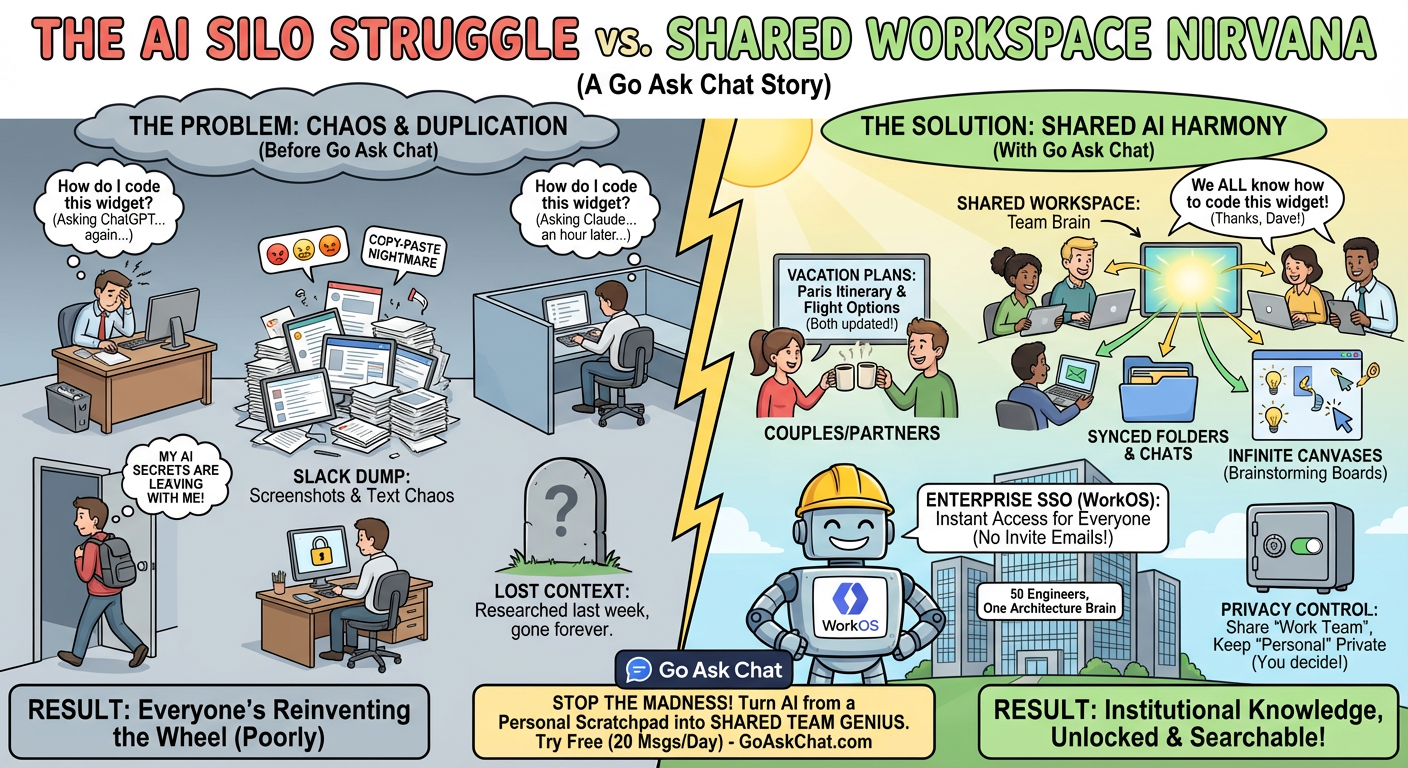
AI chats are locked to individual accounts. Your teammate solves a problem with Claude, you solve the same problem with ChatGPT an hour later. Neither of you knows the other already figured it out.
Go Ask Chat fixes this with Shared Workspaces[1]. Invite your team, spouse, or collaborators to a workspace and everyone gets access to the same chats, folders, canvases, and clipboards.
ChatGPT's shared links are read-only snapshots. Claude doesn't have sharing at all. Neither lets multiple people work in the same space.
The result:
- Duplicate work — same questions asked by different people
- Lost context — someone researched this last week but nobody can find it
- No continuity — team member leaves, their AI knowledge leaves too
- Copy-paste chaos — screenshots and text dumps in Slack
Three ways to invite people:
- Email invite — enter their email, they get a 7-day invite link
- Invite code — generate an 8-character code they can redeem (useful for Apple Sign In users with hidden emails)
- WorkOS org share — share with your entire company automatically via SSO
Once invited, they see the workspace in their sidebar. Everything syncs: chats, folders, canvases, clipboards. They can search the full history, continue conversations, and add their own.
Everything in that workspace:
- Chats — full conversation history, searchable by all members
- Folders — your organization structure stays intact
- Infinite Canvases — collaborative brainstorming boards
- Clipboards — quick snippets and shared content
- Memory — if Infinite Memory is on, the workspace memory is shared too
Your other workspaces stay private. Sharing is per-workspace.
Couples and Partners
Share a "Home" workspace with your spouse. Research vacation destinations together. Plan a kitchen renovation. Compare health insurance options. Both of you can pick up where the other left off.
Example: Home Projects Workspace
You research contractors on your lunch break. Your partner asks follow-up questions that evening. The AI remembers the full context because it's the same workspace.
Small Teams and Freelancers
Create a workspace per client. Share it with your team. Everyone can see what's been discussed, what code has been reviewed, what decisions were made. Onboard new team members instantly.
Example: Client Project Workspace
Designer asks AI about brand guidelines. Developer sees that conversation and builds accordingly. No Slack thread hunting.
Enterprise Teams
With WorkOS integration[2], your entire organization gets shared workspaces automatically. No manual invites. SSO handles authentication. Create a workspace and your whole team has access.
Example: Engineering Org Workspace
50 engineers, one shared workspace for architecture decisions. Everyone can search past discussions. New hires get context immediately.
Sharing is per-workspace. Share your "Work Team" workspace while keeping "Personal" private. Your collaborators only see what you explicitly share.
You control:
- Who has access (add or remove anyone)
- When to revoke (instant removal)
- Full audit trail of who did what
Workspace owners have full control. Remove someone and they lose access immediately. Their personal workspaces remain unaffected.
Go Ask Chat integrates with WorkOS for enterprise authentication[2]. Okta, Azure AD, Google Workspace, any SAML provider.
How it works:
- Connect your identity provider through WorkOS
- Employees sign in with company credentials
- Create an org-shared workspace
- Everyone in your organization has access automatically
No invite emails. No manual access management. Your IT team controls who's in the org, and workspace access follows.
Enterprise features:
- SSO/SAML authentication
- Admin dashboard for usage analytics
- Centralized billing
- $8/seat/month[3]
Every AI conversation contains solved problems, research, and decisions. When that stays locked in one person's account, it's lost the moment they close the tab.
Shared workspaces turn AI from a personal scratchpad into institutional knowledge. Your team's AI conversations become searchable, referenceable, and persistent.
A question asked once is answered for everyone.
Yes. Each workspace has its own sharing settings. Share "Work" with your team, keep "Personal" completely private. Collaborators only see workspaces you explicitly share with them.
They lose access immediately. The workspace disappears from their sidebar. They can't see any chats, folders, or content from that workspace anymore. All actions are logged in the audit trail.
No. They only see the specific workspace you shared. Your other workspaces, chats, and personal content are completely invisible to them.
Yes. When they accept the invite, they create an account (or sign in if they already have one). For enterprise WorkOS setups, they authenticate with company SSO.
ChatGPT has read-only shared links (snapshots, not live collaboration). Claude has no sharing features. Neither offers persistent shared workspaces where multiple people can work together in the same space.
- Go Ask Chat Features - Multi-model AI chat, workspaces, sharing
- Go Ask Chat Business - WorkOS integration, SSO, enterprise features
- Go Ask Chat Pricing - Free tier and Pro plans
† Features and specifications reflect information at time of publication. Verify current data at source links.