How to Use Gemini in Siri Right Now
Don't wait for iOS 26.4—get Google's AI through Siri today
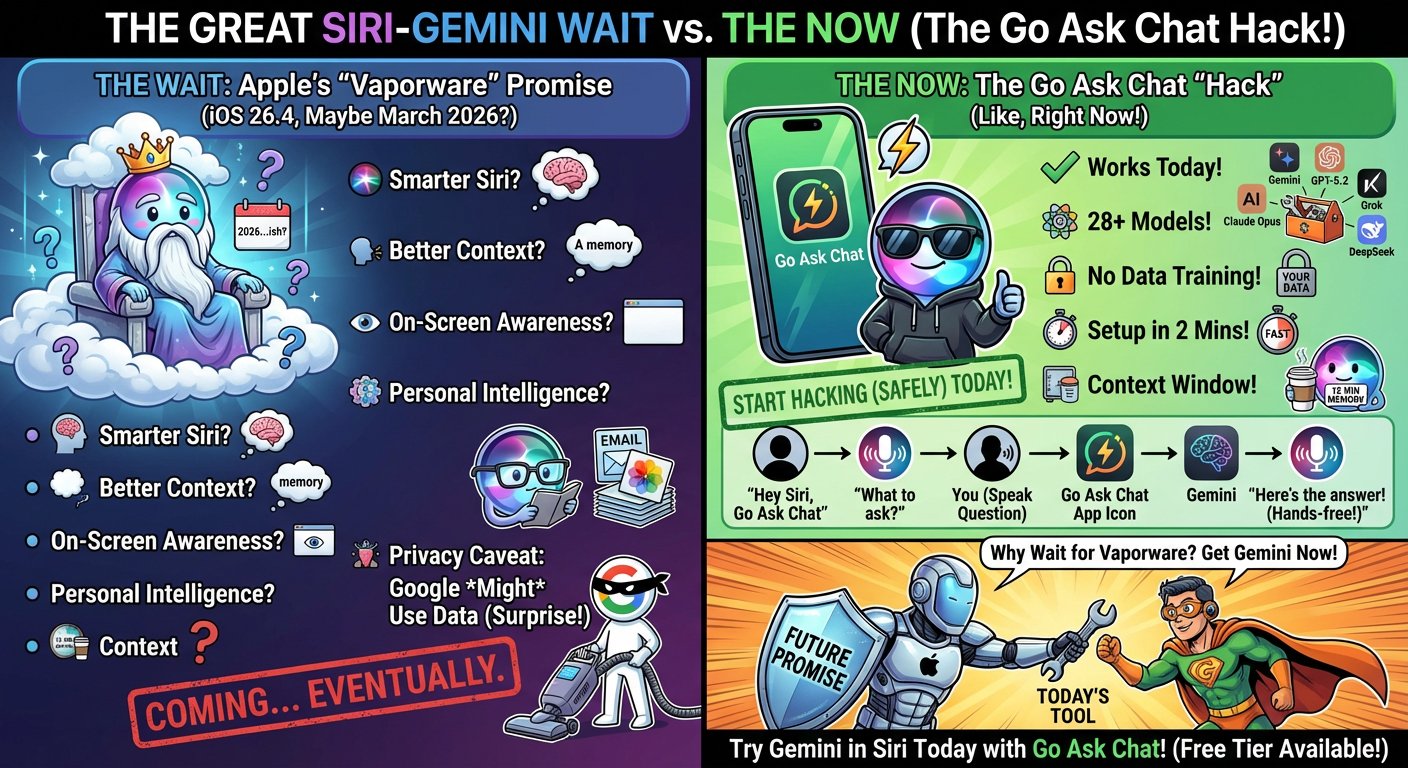
Apple's official Gemini-powered Siri is coming in iOS 26.4, expected around March or April 2026. So there's still a wait.
But you can use Gemini through Siri today with a Shortcut. It takes about 2 minutes to set up.
Apple announced a $5 billion multi-year deal with Google on January 12, 2026. Here's what they're promising:
- Smarter Siri — Gemini will power Apple Foundation Models for better understanding
- Better context — Siri will remember earlier parts of your conversation
- On-screen awareness — Siri can see what's on your screen and help with it
- Personal intelligence — Access to your emails, messages, and photos for relevant answers
The integration is white-labeled—you won't see "Powered by Google" anywhere. It'll just look like a smarter Siri.
Yes. Privacy is the big question mark.
Google's free Gemini tier uses your data to train AI models. Apple says they'll use Private Cloud Compute to protect user data, but:
- It's unclear which tier of Gemini Apple is using
- Apple's own "AppleStorm" security research (Black Hat 2025) found privacy leaks in their AI infrastructure
- The deal details haven't been fully disclosed
Apple's privacy claims are good in theory. In practice, adding Google to the mix introduces uncertainty.
Go Ask Chat lets you use Gemini (and other AI models) through a Siri Shortcut.
Setup Steps
1. Download Go Ask Chat from the App Store
2. Create a free account
3. Go to Settings → choose Gemini 2.0 Flash as your default model
4. Add the Siri Shortcut (prompted in the app)
5. Say "Hey Siri, Go Ask Chat" and ask anything
That's it. You now have Gemini accessible through Siri, hands-free.
Here's the flow:
- "Hey Siri, Go Ask Chat" — Siri launches the shortcut
- Siri prompts: "What do you want to ask?"
- You speak your question — Siri transcribes it
- Go Ask Chat processes it — Sends to Gemini (or your chosen model)
- Siri reads the response — Hands-free, no screen needed
The conversation stays open for 15 minutes. During that window, you can ask follow-up questions and the AI remembers context.
| Feature | Go Ask Chat (Now) | Apple Gemini Siri (iOS 26.4) |
|---|---|---|
| Available | Today | March/April 2026 |
| Hands-Free | Yes | Yes |
| Model Choice | 28+ (GPT, Claude, Gemini, etc.) | Gemini only |
| On-Screen Awareness | No | Yes |
| Personal Data Access | No | Yes (emails, messages) |
| Context Window | 15 minutes | Unknown |
| Conversation History | Saved to your account | Unknown |
| Data Used for Training | Never | Possibly (Google's terms) |
Apple's version will be more deeply integrated—it can see your screen and access your personal data. Go Ask Chat can't do that (only Apple can).
But Go Ask Chat gives you model choice, guaranteed privacy, and it works today.
When you use Gemini directly (Google's app or website), Google's terms apply:
- Free tier: Google can use your conversations to train AI models
- Your data is linked to your Google account
- Google retains conversation history on their servers
When you use Gemini through Go Ask Chat:
- We use enterprise API agreements that prohibit training on your data
- Your identity is anonymized — Google sees our API key, not you
- Conversations saved to YOUR account, not shared with Google
- You can delete your data anytime
Same AI, better privacy.
Go Ask Chat gives you access to 28+ AI models. You can switch anytime:
- Gemini 3 Pro — Google's flagship, great for multimodal tasks
- Gemini 2.0 Flash — Fast responses, good for quick questions
- GPT-5.2 — OpenAI's latest, excellent all-around
- Claude Opus 4.5 — Best for nuanced writing and analysis
- Grok-4.1 — Real-time information, X integration
- DeepSeek — Strong for coding tasks
Pick the best model for each task. Or set a default and change it whenever you want.
Download the app and create a free account. The free tier gives you 20 messages per day—enough to see if it works for you.
Set Gemini 2.0 Flash as your default model in settings, add the Siri Shortcut, and you're ready. Just say "Hey Siri, Go Ask Chat" whenever you want Gemini's help.
Try Gemini in Siri Today
Don't wait for iOS 26.4. Get Gemini through Siri right now with Go Ask Chat.
Get Started Free